
BlueSky began as a Twitter (X) alternative, but it has become much more. A relatively new online forum, it is being continually improved as the users’ needs evolve. New users often have questions about the best way to get around and interact on the service. Below are a few basic suggestions to help people get started.
Your Profile
One of the first things you will want to do upon signing up with BlueSky is to fill out your profile. It doesn’t have to be perfect at first. Just introduce yourself with a few lines. If your initial goal is to connect with a certain community of people, you will want to include something that indicates you’re part of that community. It will help people you follow know if they wish to follow you back. A profile picture helps, too.
Filling out your profile also allows BlueSky to know you’re a real person (though the bots are getting smarter). BlueSky requires that a profile be (at least tentatively) completed in order to let you join a starter pack, for instance.
Write a Post
Easy-peasy. Just click the blue icon, which appears both in the browser and in the phone app, and write away.

React to Posts
A good way to develop a following and make friends (or interact with friends you’ve already made) is to react to the posts of others. You can (the icons in order): Comment, Share, Like, and click the “more” dots to react in other ways.

Notifications
The notifications area is where you find out who has followed you, replied to or liked your post, and more. Just click the bell.

Make Lists
BlueSky defaults to flooding your feed with just about everything. Creating lists is easy, and a great way to sort the inflow so that you see posts and replies from people you want to follow, rather than everything from everybody.
When you log into BlueSky, you will see this icon. (It shows up by default in a web browser, but you have to click the three little lines at the top left of the page if you’re in a cellphone app).

Clicking that will take you to your lists creation page. Making a new list is pretty straightforward. Name it what you wish, and then select to pin the list to your home page. It will then show up at the top of the page, and you can select it whenever you wish to sort your feed accordingly.
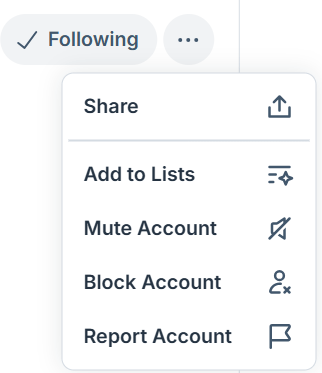
To add someone to a list, go to their profile page and select the three little dots at the top right. Choose add to lists, and a page of the lists you’ve created will appear. Just select add near the appropriate list.
Lists are not completely private; anyone going to your profile can see the lists you’ve created. However, people do have to go to your profile first to find them.
Starter Packs
It’s common for people to make Starter Packs on BlueSky. These are a great way for new users to find people to follow. I’ve made one for the Sisters in Crime Guppies, for instance. Starter packs can be found by going to a person’s profile page, where they’re listed in the options just below their description. If you want to be included in a starter pack, you simply ask the person who created it to add you. Note that you have to have your own profile at least tentatively filled in to be added. Many starter packs have simple requirements for eligibility (such as you have to be a member of the Sisters in Crime Guppies chapter to join mine, which I guess is a no-brainer).
When you visit a starter pack, you have the option to follow everyone in the pack, or follow individuals one by one. When new people are added to a starter pack, however, they don’t automatically show up in your feed. Be sure to revisit the starter pack periodically to follow the new members.
That should get you started
BlueSky offers a lot more than what is written above, such as the ability to block people, create custom feeds, report offensive content, and more. However, this introduction should help new users to get acclimated.
Visit me at https://bsky.app/profile/gaylenastasi.com
 Gayle Nastasi